
6. Hardware and how to choose.
Now that the software has been chosen, it’s time to select the hardware—and this is where many people start to feel overwhelmed. There are so many possible combinations that choosing the right components can feel daunting.
Based on the software options discussed in the previous post, you could choose something low-power and compact for basic file storage, or you could scale up to a high-performance build for virtualization, media processing, or heavier workloads.
Originally, I planned to build a simple NAS for file storage and light media use, so a modest, low-spec system would have done the job. But once I realised how powerful a NAS can be—running multiple VMs, self-hosted apps, and even acting as the backbone of an entire home network—I shifted my build toward the higher-end, with more performance and power headroom.
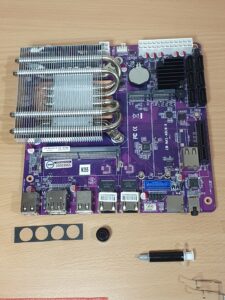
Key Components to Consider When Building a NAS
When designing a NAS, every component matters. Here’s an initial checklist of essentials:
- CPU
- RAM
- Storage
- Motherboard
- USB Ports
- USB-C Ports
- RJ45 (Ethernet) Ports
- Power Supply
- Monitor Output
- PCIe Slots
- SATA Ports
- Audio (often not needed)
- Wi-Fi (optional, often unused on NAS)
- Case
- Cooling
From here, you can begin digging deeper—but the real challenge is ensuring everything is compatible and suited to your chosen software and intended workload.
Below is a deeper breakdown of the most important hardware considerations.
CPU (Processor)
The CPU determines how much your NAS can handle beyond simple file serving.
- For basic NAS tasks, a low-power Intel Celeron, Atom, or AMD Athlon is fine.
- For ZFS, virtual machines, and containers, look for CPUs with:
- VT-x / AMD-V virtualization support
- Multiple cores
- Low TDP for power efficiency
- Intel CPUs often pair well with TrueNAS and Proxmox because of their excellent driver support.
RAM (Memory)
NAS operating systems—especially ZFS-based ones—benefit greatly from more RAM.
- Minimum: 8 GB (for basic setups)
- Recommended: 16–32 GB
- For ZFS: “1 GB per TB of storage” is a common guideline, though not mandatory
- Proxmox users running VMs should consider 32 GB or more
ECC RAM is ideal for data integrity, but not required unless your motherboard and CPU support it.
Storage (Drives)
You’ll typically combine:
- HDDs for bulk storage (NAS-rated drives recommended)
- SSDs for caching or VM storage
- NVMe for high-speed tasks, boot pools, metadata, or special workloads
Choosing between RAID, ZFS, BTRFS, or mdadm will also influence your drive layout.
Motherboard
This is the heart of your NAS and determines everything else.
Important factors include:
- Number of SATA ports
- PCIe slots for HBAs, GPUs (rare), or NICs
- M.2 NVMe slots
- Networking options (1G/2.5G/10G LAN)
- ECC support
- Form factor (Mini-ITX, mATX, ATX)
QNAP, Synology, and many custom boards use low-power embedded CPUs, but DIY builders often choose more flexible systems.
Networking (RJ45 Ports)
The network is the lifeline of your NAS.
- 1GbE is standard and sufficient for basic use
- 2.5GbE is the new sweet spot
- 10GbE is ideal for high-speed editing, virtualization, or multi-user setups
Check whether your OS supports the NIC driver (some Realtek 2.5GbE NICs require extra drivers).
Power Supply (PSU)
NAS systems don’t need gaming PSUs.
Look for:
- Quality over wattage
- 80+ Bronze or better
- SFX or ATX depending on your case
- Stable power for many HDDs (important for spin-up current)
Cooling
NAS systems run 24/7, and proper cooling ensures reliability.
- Large slow fans are quieter
- HDDs prefer temps under 40°C
- A NAS case with good airflow is crucial for drive longevity
Case
Your case must match your needs:
- How many drive bays do you need?
- Hot-swap bays?
- Compact or full tower?
- Silent operation or performance airflow?
Cases like the Jonsbo N2/N3, Fractal Node 304, and SilverStone DS380 are popular in the DIY NAS world.
Final Thoughts
Once you know what your NAS will actually do, choosing hardware becomes much easier. Whether you’re building a simple home file server or a high-performance virtualization powerhouse, the key is balancing performance, power consumption, expandability, and compatibility.
Next is actually making the choice…