
Intention for building!
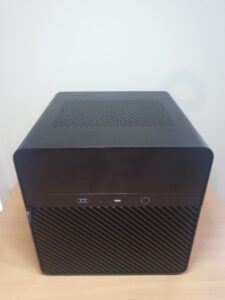
To get away from all the old computers and stacks of undersized HDDs of different sizes, I decided to dive in and build my own DIY NAS. However, I did not do so without researching what was available and what I thought I needed.
My intention was to build something small that didn’t generate much heat so I could tuck it away or take it with me in a caravan or motorhome. Obviously, I needed enough power to perform the tasks I required, which I will admit changed over time. Initially, I wanted just file storage and to run a very basic media center; as you will see, I did expand from this. You might too!
It is really important for me to access my files from anywhere in the world, so the NAS needs to run 24/7.
Another significant consideration was making sure I would never lose a file, or if I did, that I could recover it. Additionally, I recognized the necessity of setting a budget to achieve my objectives without overspending, which can happen quite easily.
Here is the final outcome, so you can observe how my research and thought process came together.
Alright, NAS enthusiasts, I can hear some of you oohing and aahing while others are yelling, “Mine’s better than yours!” or “I dislike those builds!” That’s the beauty of having choices, right? Anyway, after putting everything together, I faced very few issues, and it became evident that all the warnings and advice from the NAS community were indeed crucial and not merely suggestions. So avoid shortcuts; stick to what works and prioritize safety if possible. Mistakes can be expensive in terms of both time and money.
What remains unclear is how to configure the software, but that’s a topic for another time.
The intention is to operate Proxmox, pfSense, TrueNAS, Nextcloud, and Plex/Jellyfin for the time being. If any of this seems completely unfamiliar to you, don’t worry; I’ll provide explanations as we proceed. When I initially delved into NAS, I had no understanding of any of these concepts. However, like with anything else you learn, it becomes clearer once you’re introduced to it. Just as with using a computer: at first glance, some things can appear difficult to locate or accomplish, but once you grasp them, everything else tends to become simpler.
One aspect you’ll encounter throughout this journey is Linux—an operating system utilized in so many ways that it’s hard to cover them all. A well-rounded Linux user learns how to input commands rather than merely clicking buttons for tasks; naturally, you’ll witness how this process works.
Cant wait to see it. I want to make something like this as well.
I am waiting on more HDDs as I had to return a faulty purchase but that will come in time for showing the software setup. If you go this way you’ll be able to basically copy what I’ve done.
Also I hear this website is a little clunky so I apologize for the signup process, I’m definitely not great at web design but if anyone out there has any webpage suggestions or could provide assistance it would be most appreciated. I’d also consider giving a small gift of appreciation if I have enough people following and contributing. But really this is just a running resource for others to use however they wish.